
Have you ever been listening to a song and wondered, “What’s the BPM of this track?” Maybe you’re a music producer trying to sync loops, a DJ preparing a seamless set, or a fitness instructor building the perfect workout playlist. Whatever your reason, knowing the tempo of a song is genuinely useful — and that’s exactly where a free tap tempo BPM counter online tool comes in.
In this guide, we’ll walk you through everything you need to know about tap tempo tools: what they are, how they work, who benefits from them, and why using a free online version might be the smartest move you make today. Let’s dive in.
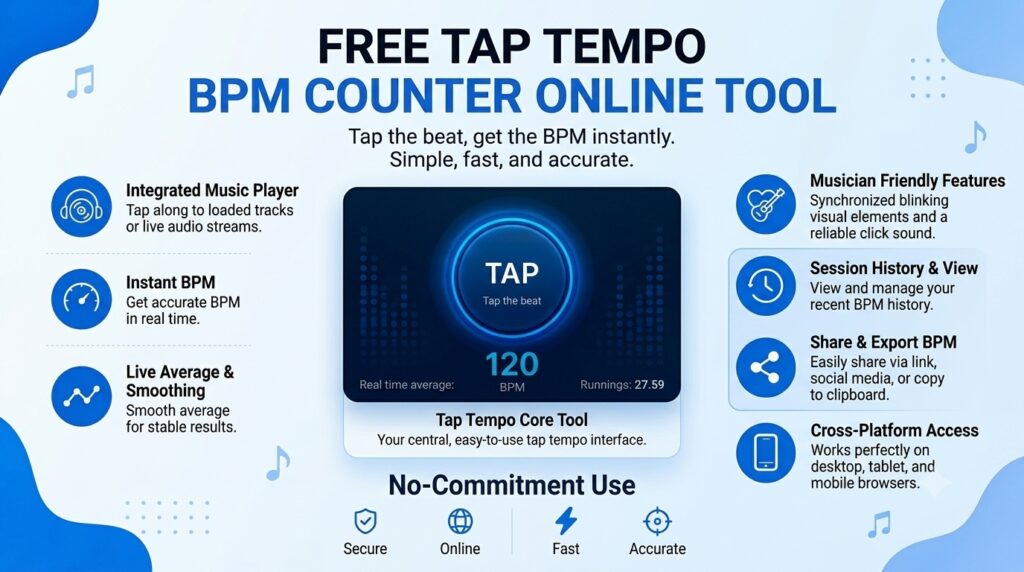
What Is a BPM Counter and Why Does It Matter?
BPM stands for beats per minute, and it’s the universal language of music tempo. A song with a BPM of 60 has one beat every second, while a high-energy track at 140 BPM feels almost frantic by comparison. Understanding BPM helps musicians, producers, DJs, dancers, and even athletes work more precisely with music.
A BPM counter is a tool that measures this tempo. A tap tempo version takes it one step further — instead of analyzing an audio file, it lets you manually tap along to the beat and calculates the BPM based on your taps. It’s simple, intuitive, and surprisingly accurate when done well.
Why BPM Accuracy Matters More Than You Think
Whether you’re looping a sample, syncing visuals to music, or setting a metronome for practice, being even slightly off on tempo can throw everything out of balance. A tap tempo BPM counter helps you stay locked in, giving you a real-time reading that you can trust.
How Does a Tap Tempo BPM Counter Work?
Using a tap tempo tool is about as easy as it gets. Here’s the basic process:
You open the tool in your browser, play the song you want to measure, and tap a button (or press a key on your keyboard) in rhythm with the beat. The tool records the time intervals between your taps and calculates the average beats per minute. After just a few taps — usually four or more — you get a reliable BPM reading.
Most online tap tempo tools also let you reset your count, see a running average, and sometimes even fine-tune the result manually. The longer and more consistently you tap, the more accurate your reading becomes.
Key Features to Look For in a Free Online BPM Tool
Not all tap tempo tools are created equal. When you’re shopping around (even for free ones), here’s what to keep an eye on:
Real-time BPM display — You want to see the number updating as you tap, not just at the end.
Keyboard shortcut support — Tapping a spacebar is much more natural than clicking a mouse, especially when you’re focused on the music.
Average calculation — A good tool uses a rolling average rather than just the last two taps, giving you a smoother and more accurate result.
Reset functionality — If you lose the beat or want to start fresh, one-click reset is essential.
Mobile responsiveness — The best tools work just as well on a phone or tablet as on a desktop, so you can use them on the go.
Who Should Use a Free Tap Tempo BPM Counter Online?
The short answer? Almost anyone who works with music regularly. But let’s get a little more specific.
Music Producers and Beat Makers
When you’re producing a track, BPM is everything. Knowing the tempo of a sample you want to flip, or confirming that your new beat matches an existing project, saves time and prevents costly mismatches. A quick tap on a free online tool gives you that information in seconds without ever leaving your browser.
DJs and Live Performers
Beatmatching is a core DJ skill, and while modern DJ software does a lot of the heavy lifting automatically, knowing how to find the BPM by ear is still valuable. Tap tempo tools serve as a quick sanity check, especially when you’re previewing tracks before adding them to your set.
Fitness Instructors and Personal Trainers
Music tempo has a measurable effect on workout intensity and motivation. Trainers who build curated playlists for spin classes, aerobics, or HIIT sessions often organize songs by BPM to create a structured energy arc throughout the class. A tap tempo counter makes categorizing your music library by tempo incredibly easy.
Dancers and Choreographers
Whether you’re working in ballet, hip-hop, contemporary, or any other style, choreography is deeply tied to tempo. Knowing the exact BPM of a song lets choreographers count measures, plan transitions, and teach students with precision.
Music Students and Teachers
Learning to internalize rhythm is a foundational music skill. Tap tempo tools make great practice aids, helping students develop a stronger sense of beat and tempo over time. Teachers can also use them to quickly verify a student’s sense of timing.
Benefits of Using a Free Online Tap Tempo Tool
Choosing a free online tool over a paid app or desktop software comes with some genuinely compelling advantages.
There’s no installation required. You open a browser tab and you’re ready to go — no app store, no downloads, no storage space used up on your device. For something you might use occasionally rather than daily, this convenience is hard to beat.
These tools are also universally accessible. Because they run in a browser, they work on any device with an internet connection — Windows, Mac, Linux, iOS, Android, it doesn’t matter. You’re never locked into one ecosystem.
And of course, they’re free. Many professional music tools cost serious money, and even subscription-based apps add up over time. A reliable tap tempo BPM counter that costs nothing is a genuinely useful addition to your toolkit.
Tips for Getting the Most Accurate BPM Reading
Even the best tool gives imprecise results if you’re tapping inconsistently. Here are some practical tips to sharpen your accuracy:
Tap more, not less. Most tools need at least four taps to start giving you reliable numbers, but eight to sixteen taps will produce a noticeably more stable average.
Focus on the downbeat. Instead of trying to tap every beat, some people find it easier to tap only on the “one” of each measure. Just multiply the result by the number of beats per measure afterward if needed.
Use a keyboard instead of a mouse. Tapping the spacebar tends to feel more rhythmic and natural than clicking a button on screen.
Eliminate distractions. If you’re tapping in a noisy environment or multitasking, your timing will suffer. Even 30 seconds of focused tapping makes a real difference.
Free Tap Tempo BPM Counter vs. Audio Analysis Tools
You might be wondering how tap tempo tools compare to audio analysis software that detects BPM automatically. Both have their place, and they’re not really competing with each other.
Audio analysis tools are great when you have a high-quality audio file and need a precise, objective reading. They scan the waveform and return a BPM with minimal effort on your part.
Tap tempo tools shine when you’re working in real time — listening to a song on a speaker, watching a live performance, or simply working with a track where you don’t have access to the file. They’re also more accessible: no uploads, no processing time, no compatibility issues.
For most everyday use cases, a tap tempo BPM counter is the faster and more flexible option.
Conclusion:
A free tap tempo BPM counter online tool is one of those quietly brilliant utilities that you don’t realize you needed until you start using it — and then you wonder how you ever managed without it. It’s fast, free, accessible from any device, and genuinely useful whether you’re producing music, teaching a dance class, or just satisfying your curiosity about a song’s tempo.
The next time you catch yourself nodding along to a track and thinking, “I wonder what the BPM is,” you’ll know exactly what to do. Open a browser, find your free tap tempo tool, and start tapping. Your ears will thank you, and so will your workflow.
Frequently Asked Questions (FAQs)
1. What is a tap tempo BPM counter?
A tap tempo BPM counter is an online tool that calculates the beats per minute of a song based on how you manually tap along to the rhythm. As you tap a button or press a key in time with the beat, the tool measures the intervals between taps and displays a real-time BPM reading.
2. Is a free online BPM counter accurate enough for professional use?
Yes, for most practical purposes. A well-designed tap tempo tool, used with consistent and focused tapping, can give you highly accurate readings — often within one or two BPM of the true tempo. For studio-level precision on audio files, you might also want to use a dedicated audio analysis tool, but for live use and quick checks, a free online counter works very well.
3. Can I use a tap tempo tool on my smartphone?
Absolutely. Most modern tap tempo BPM tools are fully responsive and work on iOS and Android devices through a mobile browser. You tap the screen instead of a keyboard, which works just as well once you get the feel for it.
4. How many taps do I need for a reliable BPM reading?
As a general rule, aim for at least eight taps before trusting the number. The first couple of taps help the tool establish a baseline, but from tap four onward, the rolling average begins to stabilize. More taps always means a more accurate result.
5. What’s a normal BPM range for different music genres?
BPM varies widely across genres. Ambient and downtempo music often sits between 60–90 BPM, hip-hop typically ranges from 80–100 BPM, pop songs commonly land between 100–130 BPM, house music usually runs 120–130 BPM, and drum and bass can hit anywhere from 160–180 BPM. These are loose guidelines, of course — every track is unique.
6. Can I use a tap tempo BPM counter to set a metronome?
Yes, and it’s a very practical use case. Many musicians tap along to a reference track to find its BPM, then enter that number into a metronome app to practice along at the same tempo. Some BPM counter tools even have a built-in metronome feature for exactly this workflow.
7. Are there any limitations to using a tap tempo tool?
The main limitation is human accuracy. Since the tool depends on how consistently you tap, songs with complex rhythms, irregular meters, or very slow tempos can be harder to measure accurately. For those cases, audio analysis software may give you a more reliable reading. That said, with a little practice, most users can get impressively accurate results even with tricky tracks.