
Have you ever been mid-jam session, trying to sync your delay pedal to the groove of a song, only to end up with a muddy, off-time echo that kills the vibe entirely? You’re not alone. Getting your guitar pedal’s tempo locked in with the music is one of those skills that separates good players from great ones — and a tap tempo BPM calculator tool is exactly what bridges that gap.
Whether you’re a bedroom guitarist experimenting with ambient sounds or a gigging musician trying to nail that Edge-style delay tone, understanding how to use a tap tempo BPM calculator can completely transform the way you interact with your effects pedals. In this guide, we’ll break it all down in a friendly, easy-to-follow way so you can spend less time fiddling and more time playing.
What Is Tap Tempo and Why Does It Matter?
The Basics of BPM
BPM stands for “beats per minute,” and it’s simply a measurement of how fast or slow a piece of music is moving. A song with a BPM of 60 has one beat per second, while a track at 120 BPM moves twice as fast. When you’re using time-based effects like delay, reverb, or tremolo, matching the rate of that effect to the song’s BPM creates a polished, musical result that feels intentional and tight.
How Tap Tempo Works
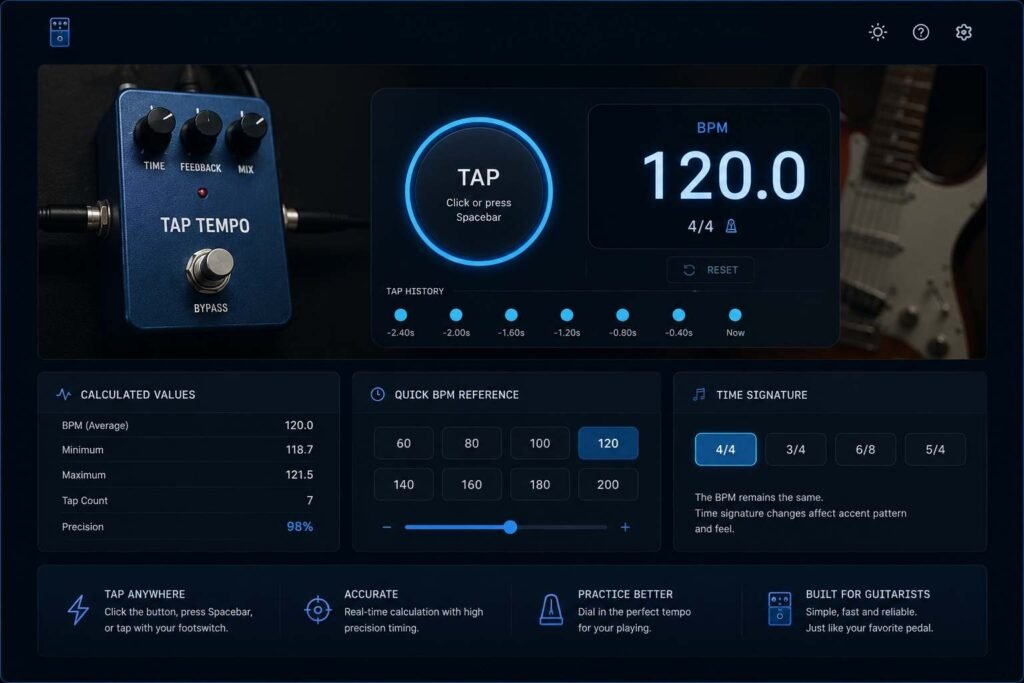
Tap tempo is exactly what it sounds like — you tap a button (or your keyboard, or your screen) in rhythm with the music, and the tool or pedal calculates the BPM based on the intervals between your taps. Most tap tempo features on guitar pedals average your taps over a few beats to give you an accurate reading, even if your timing isn’t perfectly robotic.
A tap tempo BPM calculator tool does the same thing digitally, often with additional features like note subdivision conversion, so you can translate your BPM into milliseconds for delay time settings.
How a Guitar Pedal Tap Tempo BPM Calculator Tool Works
The Math Behind the Magic
When you tap along to a song, the calculator measures the time between each tap in milliseconds. It then divides 60,000 (the number of milliseconds in a minute) by the BPM to give you the delay time in milliseconds. For example, at 120 BPM, the quarter note delay time works out to 500ms. That single calculation can be the difference between a delay that pulses perfectly with the beat and one that fights against the music.
Most online tap tempo tools and built-in pedal calculators will also offer subdivisions — half notes, quarter notes, eighth notes, triplets, and dotted notes — because not every effect sounds best on the straight beat. A dotted eighth note delay, for instance, is famously associated with the U2 sound and requires a very specific millisecond value relative to the song’s BPM.
Using the Tool Step by Step
Getting started with a tap tempo BPM calculator is refreshingly simple. Here’s a typical workflow:
Open your tap tempo tool, whether that’s an app, a website, or the built-in function on your pedal. Start playing the song or click play on your reference track. Tap the button rhythmically along with the beat — usually four to eight taps gives you a reliable average. The tool will display your BPM and the corresponding millisecond values for common subdivisions. Dial that millisecond value into your delay pedal’s time knob, and you’re locked in.
Many tools also let you manually type in a BPM if you already know the song’s tempo, which is handy when you’re working from a set list and want to pre-program your settings before a show.
Types of Tap Tempo Features Across Guitar Pedals
Dedicated Tap Tempo Buttons
Many modern delay and modulation pedals come with a dedicated tap tempo footswitch. Brands like Boss, Strymon, TC Electronic, and Eventide have built this feature into their flagship pedals, allowing you to tap the tempo live on stage without ever bending down to tweak a knob. The Boss DD-8, TC Electronic Flashback, and Strymon Timeline are excellent examples of this done right.
Subdivisions and Note Values on Pedals
Higher-end pedals give you control over note subdivisions directly on the unit. You might be able to toggle between quarter, eighth, and dotted eighth note divisions while keeping your tapped BPM intact. This level of control is a game-changer for guitarists who use multiple tap tempos across a setlist.
MIDI Tempo Sync
For players running a more sophisticated rig, MIDI clock sync takes tap tempo to another level. Your pedals can receive tempo information from a master clock device or DAW, keeping everything perfectly in sync without manual tapping. While this is beyond the scope of a basic tap tempo calculator, it’s worth knowing about as your rig evolves.
Why Use an Online Tap Tempo BPM Calculator Tool?
Practice and Rehearsal Benefits
Even if your pedal has a built-in tap tempo button, an online BPM calculator tool is incredibly useful during practice. You can use it to identify the BPM of songs you’re learning, figure out the exact delay times before you ever plug in your pedal, and build a reference sheet of tempo settings for your favorite songs.
Perfect for Home Studios
If you record guitar at home, knowing your exact BPM and corresponding delay times helps you stay in sync with your DAW’s grid. Nothing is more satisfying than a delay tail that lands exactly on the beat within a recorded track. An online tap tempo calculator lets you calculate this before you even press record.
Great for Beginners Just Getting Into Effects Pedals
If you’re new to time-based effects, a tap tempo tool demystifies the process entirely. Instead of guessing which millisecond setting sounds right, you can tap along, read the number, and dial it in with confidence. It removes the intimidation factor and helps you understand the relationship between tempo and effect timing in a very hands-on way.
Tips for Getting the Most Accurate Tap Tempo Reading
Tap More, Not Less
The more taps you input, the more accurate your BPM reading will be. Most tools recommend tapping at least four times, but tapping eight to twelve times will give you a much more stable average, especially for slower songs where small timing variations can throw off the result.
Tap on a Strong Beat
Always tap on the downbeat — typically the kick drum or snare hit — rather than a weak beat or a melodic accent. This gives you the clearest rhythmic reference and keeps your tapping consistent.
Use Headphones in Loud Environments
If you’re in a loud rehearsal space, use headphones when tapping along to a track on your phone or laptop. External noise can throw off your internal sense of timing, leading to inconsistent taps and an inaccurate BPM reading.
Reset Between Songs
If you’re moving from one song to another, always reset your tap tempo tool before tapping the new song. Leftover data from a previous calculation will skew your new reading.
Recommended Tap Tempo BPM Tools and Apps
There are several solid options out there worth bookmarking or downloading. Online tools like TapTempo.io and the BPM tap tool on BPMTap.com are clean, fast, and free — they work great on both desktop and mobile browsers. For mobile users, apps like Tempo by Frozen Ape (iOS) and BPM Detector (Android) offer tap tempo features alongside metronome functions, making them a nice all-in-one package for practicing musicians. Many guitar-focused apps like GuitarTuna and Boss Tone Studio also include tempo tools built into their feature sets.
Strong Conclusion
A guitar pedal tap tempo BPM calculator tool is one of those deceptively simple things that makes a massive difference in your playing. Once you understand how to use it, you’ll never go back to randomly twisting the delay time knob and hoping for the best. Every effect will feel more intentional, your tone will sit better in the mix, and you’ll carry yourself with more confidence on stage or in the studio.
Whether you’re tapping out the tempo on a free online tool, using a dedicated footswitch on your pedal, or running a MIDI-synced rig, the core idea remains the same: music is all about timing, and your effects should honor that. So next time you sit down with your guitar and your favorite delay pedal, take thirty seconds to tap in your BPM. Your ears — and your bandmates — will thank you.
Frequently Asked Questions
What is a tap tempo BPM calculator tool used for? A tap tempo BPM calculator tool is used to determine the beats per minute of a song by tapping along to its rhythm. For guitarists, it’s especially useful for calculating the correct millisecond delay time to sync time-based effects like delay and tremolo with the tempo of a song.
How do I convert BPM to milliseconds for my delay pedal? The formula is straightforward: divide 60,000 by the BPM to get the quarter note delay time in milliseconds. For example, 120 BPM gives you 500ms for a quarter note delay. Most tap tempo tools automatically display this conversion alongside common subdivisions like eighth notes and dotted eighth notes.
How many taps do I need for an accurate BPM reading? Most tap tempo tools recommend at least four taps for a usable reading, but tapping eight to twelve times will give you a more accurate average, especially for slower tempos. More taps reduce the impact of slight human timing variations.
Can I use a tap tempo tool without a physical guitar pedal? Absolutely. Online tap tempo calculators and smartphone apps work perfectly well on their own. They’re great for calculating delay times before a session, identifying the BPM of songs you’re learning, or building a tempo reference list for your setlist.
What is a dotted eighth note delay and why is it popular? A dotted eighth note delay plays back at 75% of the quarter note delay time for a given BPM. It creates a rhythmic “slapback” feel where the echo lands between beats rather than on them. It became iconic thanks to The Edge from U2 and is widely used for creating that spacious, shimmering sound on clean tones.
Does my guitar pedal need a tap tempo button to use these calculations? No. Even if your pedal has a fixed time knob (measured in milliseconds), you can use a tap tempo calculator to find the right millisecond value and then manually set it on your pedal. The tap tempo button simply makes this process faster and hands-free during live performance.
Are there free tap tempo BPM calculator tools available? Yes, there are plenty of free options. Many websites offer browser-based tap tempo tools at no cost, and free mobile apps with tap tempo features are widely available on both iOS and Android. You don’t need to spend a penny to get accurate BPM and delay time calculations.